JSON Graph Entry Format (GEF)
How to interpret various JSON constructs as a graph, mapped to Connected JSON (CJ).
Date |
2025-07-14 |
|---|---|
Editor |
Dr. Max Völkel |
Status |
Working Draft |
Git |
1. Introduction
1.1. Goals and Motivation
Real-world JSON comes in many dialects and variants. This document defines how to interpret various JSON structures unambiguously as a graph of nodes and edges. For clarity, the interpretation as Connected JSON (CJ) is given. Many formats in the wild are already quite close to Connected JSON (CJ) anyway. Graph Entry Format (GEF) is a superset of JSON Graph Format.
Different from GraphML and Connected JSON (CJ), this format allows flexible data attachment directly onto elements alongside the core graph structure:
Any element can carry arbitrary additional properties.
No intermediate data required.
As this format is meant for relaxed parsing of various CJ-like JSON dialects, it does not define rules for stream processing. See Notes on Streaming JSON and especially Streaming in CJ for details.
1.2. Example
First of all, all Connected JSON (CJ) files are valid Graph Entry Format (GEF). So look at the example in the CJ specification.
Here is a simple example showcasing some additional features:
{
  "nodes": [
    // can use a number for an ID
    { "id":  12 },
    { "id":  "a",
      "ports": [ "a1",
                 { "id": "a2",
                   "ports": [ "a2-1", "a2-2" ]
    }]},
    { "id":  "b", "foo": "bar" },
    { "id":  "c" },
    { "id":  "d" },
    { "id":  "e" },
    { "id":  "f" }
  ],
  // Have any JSON just here, not `data` wrapping
  "hello": ["My data","can be","here"],
  "edges": [
    // source & target shortcuts
    { "source": 12, "target": "a"},
    // normal CJ endpoints
    { "endpoints":  [
      { "direction": "in", "node": 12, "port":  "a2-1"},
      { "direction": "out", "node": "a"}
    ]},

    // ports only available in endpoints syntax
    { "endpoints":  [
      { "direction": "in", "node": 12},
      { "direction": "in", "node": "a", "port": "a2-1" },
      { "direction": "out", "node": "d"},
      { "direction": "out", "node": "e"}
    ]},

    // mixed edges only available in endpoints syntax
    { "endpoints":  [
      { "direction": "in", "node": 12},
      { "direction": "in", "node": "a"},
      { "direction": "out", "node": "d"},
      { "direction": "out", "node": "e"},
      { "direction": "undir", "node": "f"}
    ]}
  ]
}
1.3. Change Log
- 2025-07-14: Version 5.0.0
-
-
Split spec into two parts: Connected JSON (CJ) for writing strict files, where there is always only one option to encode a structure and Graph Entry Format (GEF) which is much more liberal and flexible in parsing.
-
Moved
edgeDefaultto Graph Entry Format (GEF).
-
2. Overview
Graph Entry Format (GEF) uses the same conceptual model as Connected JSON (CJ), but it maps a broader range of JSON structures to the graph model. It is a superset of Connected JSON (CJ).
2.1. Conventions
Where a property is just copied over from the Connected JSON (CJ) specification with the exact same semantics, we use the symbolic → to indicate this, followed by a link to the documentation in the Cj spec, prefixed with CJ:.
2.2. Polymorphism
Graph Entry Format (GEF) uses a kind of 'JSON polymorphism': A property allows multiple JSON types to be used. Interpretation of that JSON value depends on the used type.
-
For example, the property
labelis in Graph Entry Format (GEF) either a JSON string or a JSON object (multilingual like in Connected JSON (CJ)). Interpretation is defined per property. -
Some properties allow for either a JSON object or a JSON array with multiple such objects. Example:
graphandgraphs. Their interpretation is described below.
3. Elements
Every element can carry arbitrary JSON properties besides the ones interpreted by this spec. The interplay with the explicit data property is described in Data.
|
3.1. Document
For the default document structure, see CJ Document.
In Graph Entry Format (GEF), a graph can be stated at the root level, without using a graph property.
Using a graph property is additionally allowed, effectively creating subgraphs.
If any Graph-level attributes are used, a synthetic root graph is created.
The graph-level properties are applied to this synthetic root graph.
If subgraphs are created, those properties inherit downwards as usual.
| Property | Type | Description |
|---|---|---|
|
|
Optional. Document-level. Documented in CJ Document. |
|
|
Optional. Document-level. Documented in CJ Document Metadata. |
|
|
Optional. Graph-level. Documented in Graph. |
|
|
Optional. Graph-level. Documented in Graph. |
|
|
Optional. Graph-level. Documented in CJ Graph. |
|
|
Optional. Document-level. Can also be used inside graphs. Documented in CJ Document and CJ Graph. |
|
|
|
|
|
|
|
|
|
|
|
Optional. Graph-level. Documented in CJ Graph. A number is converted to string to be used as ID. |
|
|
|
|
|
Optional. Graph-level. Documented in CJ Graph. |
|
|
Optional. Graph-level. See Label. |
|
|
Optional. Graph Metadata]. |
|
|
Optional. Graph-level. Documented in CJ Graph. |
graphandgraphs-
If both are used, a single array is constructed with the entry of
graphfirst, followed by the entries ofgraphs. The whole array is then considered the value ofgraphs.
| The pattern of allowing both (a) a single object or (b) an array of a-objects, is used throughout the spec. |
3.2. ID
In all places where a CJ ID can be used, Graph Entry Format (GEF) also allows to state the ID using a JSON number.
This number is converted at parse-time into the corresponding string.
E.g., the number 3 is convered to the string id "3".
Floating-point numbers or negative numbers are not allowed.
3.3. Label
A label definition like "label": "Hello, World" has no language information.
It is interpreted as { "value": x } with x being the string value.
In other words: A CJ Label without language.
3.4. Graph
For the default graph structure, see Graph in Connected JSON (CJ). Graph Entry Format (GEF) adds some aliases.
| Property | Type | Description |
|---|---|---|
|
|
Optional.
Default: |
|
|
Optional. Default is |
|
|
|
|
|
Is converted to string and interpreted as a CJ ID. |
|
|
|
|
|
Optional. See Label. |
|
|
Optional. Graph Metadata]. |
|
|
0 to n nodes. Default: Empty. |
|
|
|
|
|
|
|
|
|
|
|
Polymorph object and array |
|
|
3.4.1. Nested Graph as Compound Node
The graph-level compoundNode property can be used on a graph (or document) to force processing as if the subgraph had been nested in a node.
The compoundNode setting is inherited downwards from parent to child graphs, for all kinds of nesting. Child graphs may overwrite a parent setting. In this case, the redefined value is inherited downwards.
Graph Entry Format (GEF) Input
|
Connected JSON (CJ) Interpretation
|
3.5. Node
For the default node structure, see Node in Connected JSON (CJ).
| Property | Type | Description |
|---|---|---|
|
|
|
|
|
Is converted to string and interpreted as a CJ ID. |
|
|
Interpreted as |
|
|
|
|
|
|
|
|
|
|
|
|
|
|
Polymorph object and array |
3.6. Port
For the default port structure, see Port in Connected JSON (CJ).
| Property | Type | Description |
|---|---|---|
|
|
|
|
|
See ID |
|
|
|
|
|
See Label |
|
|
3.7. Edge
For the default edge structure, see Edge in Connected JSON (CJ).
| Property | Type | Description |
|---|---|---|
|
|
|
|
|
See ID |
|
|
Default: |
|
|
|
|
|
See Label |
|
|
→ CJ Edge. |
|
|
→ CJ Edge. |
|
|
→ CJ Edge. |
|
|
Interpreted as the ID of the Node that defines the type of edge. Like CJ Edge. |
Defining Endpoints |
||
|
|
A single node id interpreted as endpoint with direction |
|
|
A single node id (converted to string) interpreted as endpoint with direction |
|
|
An array containing either strings or integers (converted to strings) interpreted as node id in an endpoint with direction |
|
|
A single node id interpreted as endpoint with direction |
|
|
A single node id (converted to string) interpreted as endpoint with direction |
|
|
An array containing either strings or integers (converted to strings) interpreted as node id in an endpoint with direction |
|
|
A single node id interpreted as endpoint with direction |
|
|
A single node id (converted to string) interpreted as endpoint with direction |
|
|
An array containing either strings or integers (converted to strings) interpreted as node id in an endpoint with direction |
|
|
A single node id interpreted as endpoint with direction |
|
|
A single node id (converted to string) interpreted as endpoint with direction |
|
|
An array containing either strings or integers (converted to strings) interpreted as node id in an endpoint with direction |
|
|
This is the canonical way to express edges. |
Nested Graphs |
||
|
|
|
|
|
|
|
|
Polymorph object and array |
|
|
|
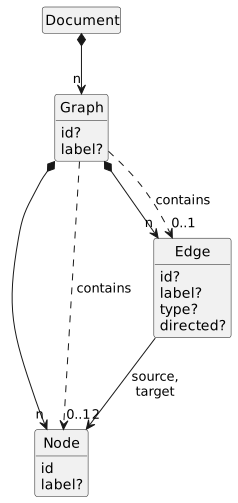
All endpoint-generating properties () are evaluated and generate endpoints.
Shortcut syntax: All created endpoints are interpreted as incoming. I.e. "source": "n17" has the same effect as
"endpoint": { "node":"n17", "direction": "in" }. Ports are only available in endpoints property.
Shortcut syntax: All created endpoints are interpreted as outgoing. I.e.
"target": "n12" has the same effect as
"endpoint": { "node":"n12", "direction": "out" }.
3.8. Edge Endpoint
For the default endpoint structure, see Endpoint in Connected JSON (CJ).
| Property | Type | Description |
|---|---|---|
|
|
→ CJ Endpoint. |
|
|
→ CJ Endpoint. |
|
|
Required property. Value may be |
|
|
→ CJ Endpoint. |
|
|
|
|
|
→ CJ Endpoint. |
|
|
→ CJ Endpoint. |
|
|
→ CJ Endpoint. |
|
|
Auto-converted to a string and interpreted like CJ Endpoint. |
4. Features
4.1. Data
In Connected JSON (CJ), extended data can only be attached to elements via the data property.
In Graph Entry Format (GEF), data handling is much more relaxed: Each element defined in this spec can have arbitrary additional JSON properties — except those defined in this spec. All additional properties are interpreted as data attached to the structural element. Nested JSON is allowed.
Any other properties are copied over as user-data.
Values within the data property remain.
Graph Entry Format (GEF) Input
|
Connected JSON (CJ) Interpretation
|
Edge case: If an object, e.g., a node, is using both a direct JSON property and the same time the same property key within the data object, but with a different value, then both properties are 'shifted outwards'.
Graph Entry Format (GEF) Input
|
Connected JSON (CJ) Interpretation
|
4.2. Edge Direction
The edge direction can be stated in three locations: (1) on the graph, (2) on each edge, and (3) on each endpoint. The precedence is as follows: endpoint > edge > graph.
-
The Graph property
edgeDefaultcan be used to set a default direction for all edges in the graph. The two valid values aredirectedandundirected(the default). This has only an effect if neither the edge nor an endpoint override this setting. -
An Edge may state a
directedproperty. If set totrue, the edge is directed. If set tofalse, the edge is undirected. How to interpret a hyperedge with, e.g. 4 endpoints as directed? In Graph Entry Format (GEF), the first endpoint is interpreted asinand all others asout. -
Each Edge Endpoint can use a
directionproperty to explicitly state its direction. The valid values arein,out, andundir(undirected). This option is the only one supported by Connected JSON (CJ).
| Input | Result | ||
|---|---|---|---|
endpoint |
edge |
graph |
Result Endpoint Direction |
|
Ignored, endpoint is stated |
|
|
|
|
||
|
|
||
— |
|
Ignored, edge is stated |
|
|
|
||
— |
— |
|
|
|
|
||
4.3. Alias Properties
Some properties, such as Edge Endpoint dir, are an alias for another property (here: direction).
-
If both aliases and the original property are stated, alias values are ignored. See exceptions below. And a parser warning is emitted if the values differ.
-
Arrays: When one is a single-value and the other is an array, the single value is prepended to the array. The resulting merged array is used. If both state arrays, the arrays are merged. First lexicographically sorted aliases, then the original property.
Graph Entry Format (GEF) Graph Input
|
Connected JSON (CJ) Interpretation
|
-
If multiple aliases are defined, but no original property, the lexicographically first such alias is used. And a parser warning is emitted if the values differ.
-
Endpoints: All endpoint properties generate endpoints of an edge. So
sourceneither is not overwritten byendpoints.
Appendix A: Reserved Property Names
The following property names are used by Connected JSON (CJ) in certain places.
| Property | Usage |
|---|---|
|
CJ: Graph base URI for RDF interpretation |
|
Suggested for Node, Edge, Graph, Port, Edge Endpoint description. Will end up in |
|
Alias for Edge |
|
Edge directedness |
|
|
|
|
|
CJ: Edge Endpoint direction (in/out/undir) |
|
Graph default edge direction |
|
Alias for Edge |
|
CJ: Graph edges |
|
Alias for Edge |
|
CJ: Edge endpoints |
|
Alias for Edge |
|
Alias for Graph |
|
|
|
Alias for Edge |
|
|
|
|
|
CJ: Label |
|
CJ: Edge Endpoint referenced node id |
|
|
|
CJ: Graph nodes |
|
CJ: Edge Endpoint referenced port id |
|
CJ: Node ports |
|
|
|
Alias for Edge |
|
|
|
Alias for Edge |
|
Alias for Edge |
|
CJ: Edge, Edge Endpoint |
|
CJ: Edge, Edge Endpoint |
|
CJ: Edge, Edge Endpoint |
|
CJ: Label |
| Value | Is Aliases For | Usage in |
|---|---|---|
|
|
|
|
|
|
|
|
|
|
|